Blog
Stack vs Heap in Java
Stack vs Heap in Java — Explained Simply with Real-Time Understanding ☕🚀
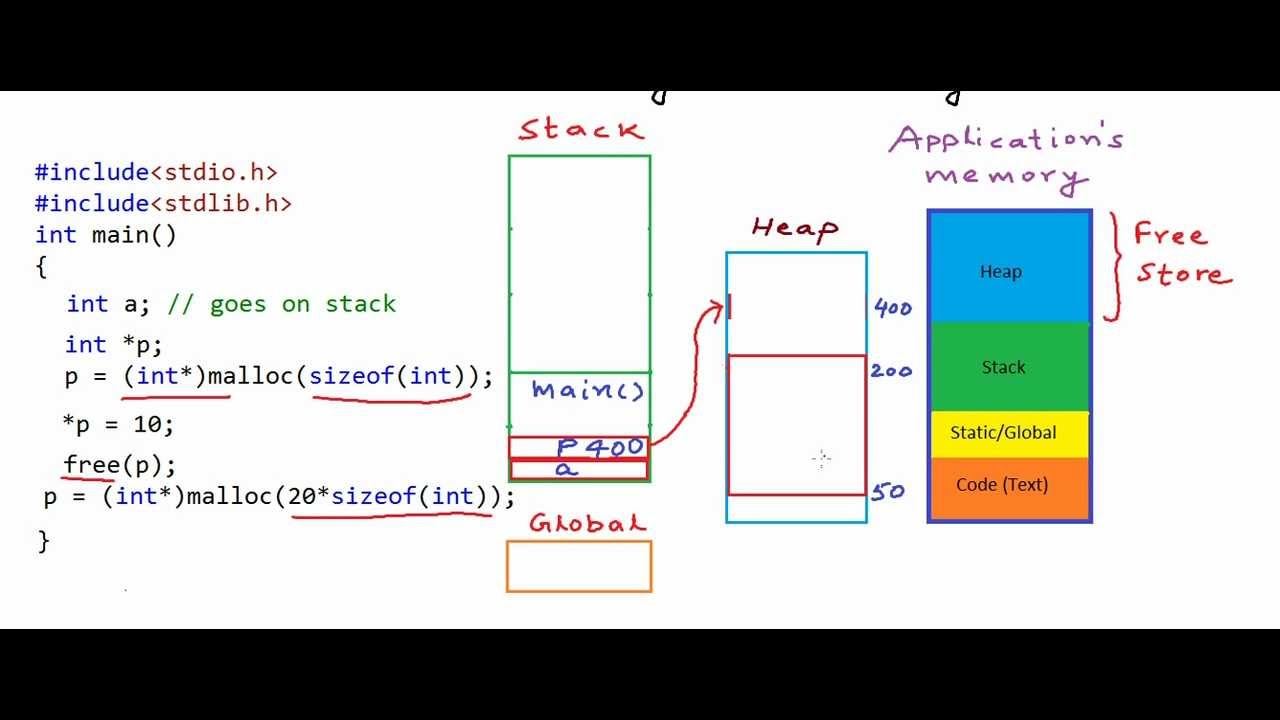
Stack vs Heap in Java — Explained Simply with Real-Time Understanding ☕🚀
One of the most commonly asked Java interview questions is:
“What is the difference between Stack and Heap memory in Java?”
As Java developers, understanding memory management is extremely important because it directly impacts:
✅ Performance ✅ Scalability ✅ Garbage Collection ✅ Application Stability ✅ Debugging Memory Leaks & OutOfMemoryError
Let’s break it down in a simple and practical way.
1️⃣ Stack Memory in Java
Stack memory stores:
- Method calls
- Local variables
- Method execution data
- References to objects
Each thread in Java gets its own stack memory.
When a method is called:
- A stack frame is created
- Local variables are stored
- After method execution, the frame is removed automatically
Example
public class Demo {
    public static void main(String[] args) {
        int number = 10;
        Employee emp = new Employee();

        display(number);
    }

    static void display(int value) {
        int result = value + 5;
    }
}
Stack Stores:
numbervalueresult- reference variable
emp
2️⃣ Heap Memory in Java
Heap memory stores:
- Objects
- Instance variables
- Arrays
- Class instances
Heap memory is shared among all threads.
Objects created using new keyword are stored in Heap.
Example
Employee emp = new Employee();
Here:
empreference → Stacknew Employee()object → Heap
3️⃣ Simple Visualization
STACK MEMORY                 HEAP MEMORY
--------------              ----------------
main()                      Employee Object
number = 10                 name = "John"

emp -----------reference---->
4️⃣ Key Differences Between Stack and Heap
| Feature | Stack | Heap |
|---|---|---|
| Stores | Local variables & method calls | Objects & instance data |
| Memory Management | Automatic | Managed by Garbage Collector |
| Access Speed | Faster | Slower |
| Thread Safety | Thread-specific | Shared among threads |
| Size | Smaller | Larger |
| Lifetime | Till method execution | Till object becomes unreachable |
5️⃣ Why Stack is Faster?
Stack memory follows:
LIFO (Last In First Out)
This makes allocation and deallocation extremely fast.
Heap requires:
- Dynamic memory allocation
- Garbage collection
- Object tracking
So Heap operations are comparatively slower.
6️⃣ Real-Time Scenario
Suppose you have:
public void processOrder() {
    Order order = new Order();
}
What Happens?
Stack:
- Stores method execution
- Stores reference variable
order
Heap:
- Stores actual
Orderobject
When method completes:
- Stack frame removed immediately
- Heap object waits for Garbage Collection
7️⃣ Common Interview Question
Why does StackOverflowError happen?
Because stack memory is limited.
Usually caused by:
- Infinite recursion
- Deep recursive calls
Example:
public void test() {
    test();
}
This continuously creates stack frames until memory exhausts.
8️⃣ Why OutOfMemoryError Happens?
Heap memory gets exhausted when:
- Too many objects are created
- Objects are not garbage collected
- Memory leaks exist
Example:
List<String> list = new ArrayList<>();

while(true) {
    list.add("Memory Leak");
}
This continuously fills heap memory.
9️⃣ Garbage Collection and Heap
Java Garbage Collector works mainly on Heap memory.
It removes objects that are:
- No longer referenced
- Unreachable
This helps Java manage memory automatically.
🔟 Pro Tip for Developers
Understanding Stack vs Heap helps in:
✅ Performance optimization ✅ Debugging production issues ✅ Writing memory-efficient applications ✅ Handling microservices scalability ✅ JVM tuning and profiling
Final Takeaway
Stack = Method Execution Memory
Heap = Object Storage Memory
A Java application becomes stronger when developers understand how memory actually works behind the scenes.
And honestly, many real production issues start from poor memory understanding.
Hashtags
#Java #JVM #Programming #SoftwareEngineering #BackendDevelopment #SpringBoot #Microservices #JavaDeveloper #CodingInterview #TechLearning #FullStackDeveloper #GarbageCollection #MemoryManagement